Workshop Overview
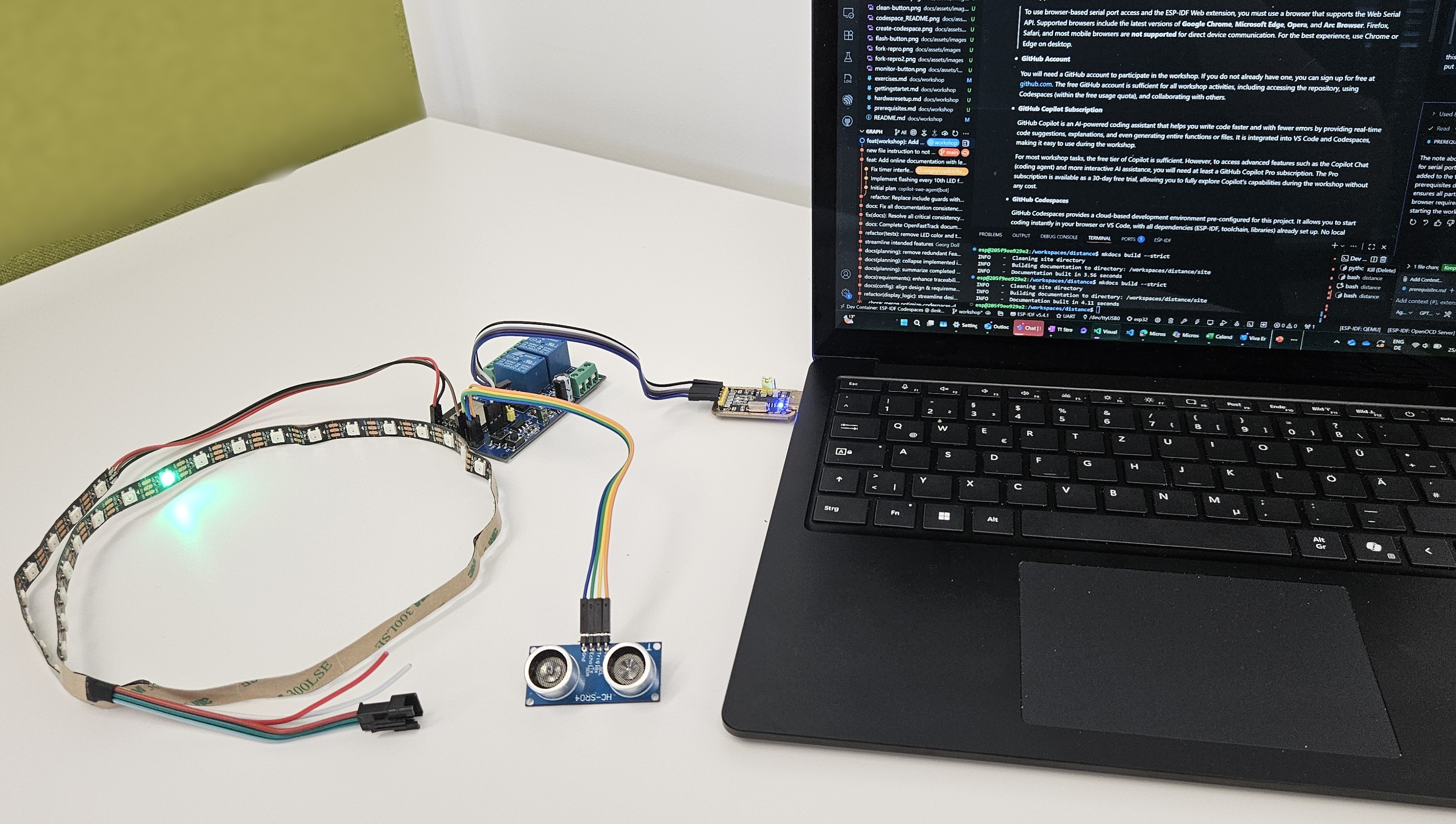
Welcome to the ESP32 Distance Sensor Workshop! This hands-on workshop is designed to get you coding on real hardware in just 5 minutes—no complicated setup, no frustration!
Well at least thats the goal 😉, if you experience issues, feel free to contact us.
Workshop Materials:
- Workshop Prerequisites
- Getting Started with the Workshop
- Workshop Setup Flow
- Step 1: Fork the Repository
- Step 2: Create a Codespace
- Step 3: Install ESP-IDF Web Extension
- Step 4: Personalize Your Environment (Optional)
- Step 5: Explore the Codespace Interface
- Step 6: Build the Project
- Step 7: Choose Your Path
- Step 8: Monitor the Device
- Step 9: Experience the Running System
- Step 10: Familiarize with Repository Structure
- Next Steps: Workshop Exercises
- Troubleshooting
- Getting Help
- Hardware Setup
- Workshop Exercises
Quick Start Path
If you have a GitHub account and the required hardware, you can:
Fork this project from GitHub
Create a new Codespace (just a few clicks)
Wait ~5 minutes for setup (all tools & dependencies installed automatically)
Activate ESP-IDF Web plugin (required for direct hardware connection)
Start coding and flashing your ESP32—productive immediately!
Note
It’s really that easy: From zero to coding on real hardware in minutes. No local installs, no driver hassle, no toolchain pain.
What You Need
Minimum Requirements:
GitHub account (free or pro tier)
Required hardware - See Hardware Setup for details
Supported browser - Check Workshop Prerequisites for browser requirements
Optional but recommended:
Physical ESP32 board, sensor, and LED strip (can start with QEMU emulation)
GitHub Copilot access (enhances learning experience)
Getting Started
New to the workshop? Start here:
Check Prerequisites - Review Workshop Prerequisites to ensure your browser and account are ready
Get Hardware Ready - Follow Hardware Setup for component assembly
Begin Workshop - Work through Getting Started with the Workshop step-by-step
Complete Exercises - Try the challenges in Workshop Exercises
Tip
No hardware yet? Start with QEMU emulation! You can complete most of the workshop using the emulator, then add hardware later. See the main Quick Start Guide guide for QEMU setup.
What You’ll Learn
This workshop covers modern embedded development practices:
Embedded Systems Fundamentals:
ESP32 microcontroller architecture
FreeRTOS real-time operating system
Hardware interfaces (GPIO, UART, RMT)
Sensor integration (HC-SR04 ultrasonic)
LED control (WS2812 addressable LEDs)
IoT Connectivity:
WiFi networking (AP and STA modes)
HTTP web server implementation
Captive portal for configuration
Configuration persistence (NVS storage)
Modern Development Tools:
GitHub Codespaces for cloud development
ESP-IDF official development framework
QEMU emulation for hardware-optional testing
GDB debugging with breakpoints
GitHub Copilot for AI-assisted coding
Software Engineering:
Component-based architecture
Requirements engineering with Sphinx-Needs
Professional documentation practices
Version control with Git
Testing and validation
Workshop Structure
The workshop is organized into progressive sections:
Part 1: Setup & Basics (30 minutes)
Environment setup with Codespaces
First build and flash
Understanding the project structure
Basic sensor and LED testing
Part 2: Understanding the Code (45 minutes)
Component architecture walkthrough
FreeRTOS task management
Sensor reading and processing
LED visualization logic
Part 3: Customization (60 minutes)
Modify LED patterns and colors
Implement color zones (red/yellow/green)
Adjust distance ranges
Add custom features
Part 4: Advanced Topics (Optional, 45 minutes)
Web interface customization
Configuration management
QEMU emulation and debugging
Requirements traceability
Total Workshop Time: 2-3 hours (self-paced)
Workshop Benefits
Why This Workshop?
Zero-Setup Development:
No local installation required
Supports local defcontainer setup if codespaces is not an option
Consistent environment for all participants
Works on Windows, Mac, Linux, Chromebook
Hands-On Learning:
Real hardware interaction (or QEMU simulation)
Immediate feedback with LED visualization
Practical IoT device with real-world application
Build something you can actually use!
Professional Practices:
Industry-standard tools (ESP-IDF, FreeRTOS)
Modern development workflow (Codespaces, Git)
Requirements engineering methodology
Component-based architecture
AI-Assisted Development:
GitHub Copilot integration
Learn how AI helps with embedded development
Practical examples of AI code generation
Troubleshooting with AI assistance
Workshop Tips
Use GitHub Copilot:
If you have Copilot access, use it throughout the workshop:
Ask Copilot Chat for explanations of ESP32 concepts
Get code suggestions for modifications
Troubleshoot errors with AI assistance
Learn ESP-IDF APIs interactively
Work at Your Own Pace:
All materials are self-paced
Take breaks when needed
Experiment and explore beyond the exercises
Don’t worry about breaking things (easy to reset!)
Ask for Help:
Workshop materials include troubleshooting sections
Check the main documentation for detailed guides
Open GitHub issues for specific problems
Join discussions for general questions
And if it’s a handon session, ask the facilitator!
Have Fun:
This is about learning and experimenting
Try different LED patterns and colors
Customize the project to your needs
Share your creations with the community!
Prerequisites & Setup
Before starting the workshop:
Prerequisites (Workshop Prerequisites)
GitHub account setup
Browser requirements
Hardware checklist (if using physical devices)
Hardware Setup (Hardware Setup)
Component identification
Wiring and connections
Power considerations
Testing hardware
Getting Started (Getting Started with the Workshop)
Fork and clone repository
Create Codespace
Build and flash
First test run
Workshop Exercises
Once you’re set up, work through the exercises:
Workshop Exercises - Hands-on challenges and learning activities
Exercise Topics:
Modify LED colors and patterns
Implement distance-based color zones
Add sound alerts (if using buzzer)
Customize web interface
Create your own features
Getting Help
During the Workshop:
Check troubleshooting sections in each guide
Use GitHub Copilot for immediate assistance
Review the main documentation at ESP32 Distance Sensor
Ask workshop facilitator (if in guided workshop)
After the Workshop:
GitHub Issues - Report bugs or ask questions
GitHub Discussions - General questions and ideas
Community support - Share your projects and help others!
Documentation Resources:
Project Overview - Project overview and introduction
Requirements Documentation - System requirements
Design Specifications - Design specifications
Development Guide - Development guides (QEMU, debugging)
Next Steps
Ready to begin? Start with:
Workshop Prerequisites - Check browser and account requirements
Hardware Setup - Prepare your hardware (or plan for QEMU)
Getting Started with the Workshop - Fork, build, and flash!
Workshop Exercises - Complete the challenges
Note
Remote Workshop? All materials work perfectly with QEMU emulation. Participants can follow along without any hardware, then add physical devices later if desired.
—
Let’s build something awesome together! 🚀
Have fun, experiment, and happy coding! 🎉